




For many sales teams, Microsoft PowerPoint, Word, and Excel remain central to how presentations, proposals, and calculations are prepared.
At the same time, content governance matters. Files are shared through Showell to ensure sellers use approved materials. Direct downloads may be limited. Shared Workspace files must remain protected.
This creates a familiar challenge.
How do you allow sellers to work in PowerPoint, Word, or Excel without losing control over master content? Showell’s Microsoft 365 Office Editor solves this.
💡 Available as an add-on for Professional and Enterprise plans, the Microsoft 365 Office Editor allows users and administrators to create, edit, and sync Office files directly within Showell, fully integrated with their Microsoft 365 account.
Work on MS Office Files Without Leaving Showell
The Microsoft 365 Office Editor enables you to create and edit: PowerPoint presentations, Word documents, Excel spreadsheets
Files can be created directly from My Files by all users. Administrators can also create Office files anywhere in the Workspace using the Showell Web App.
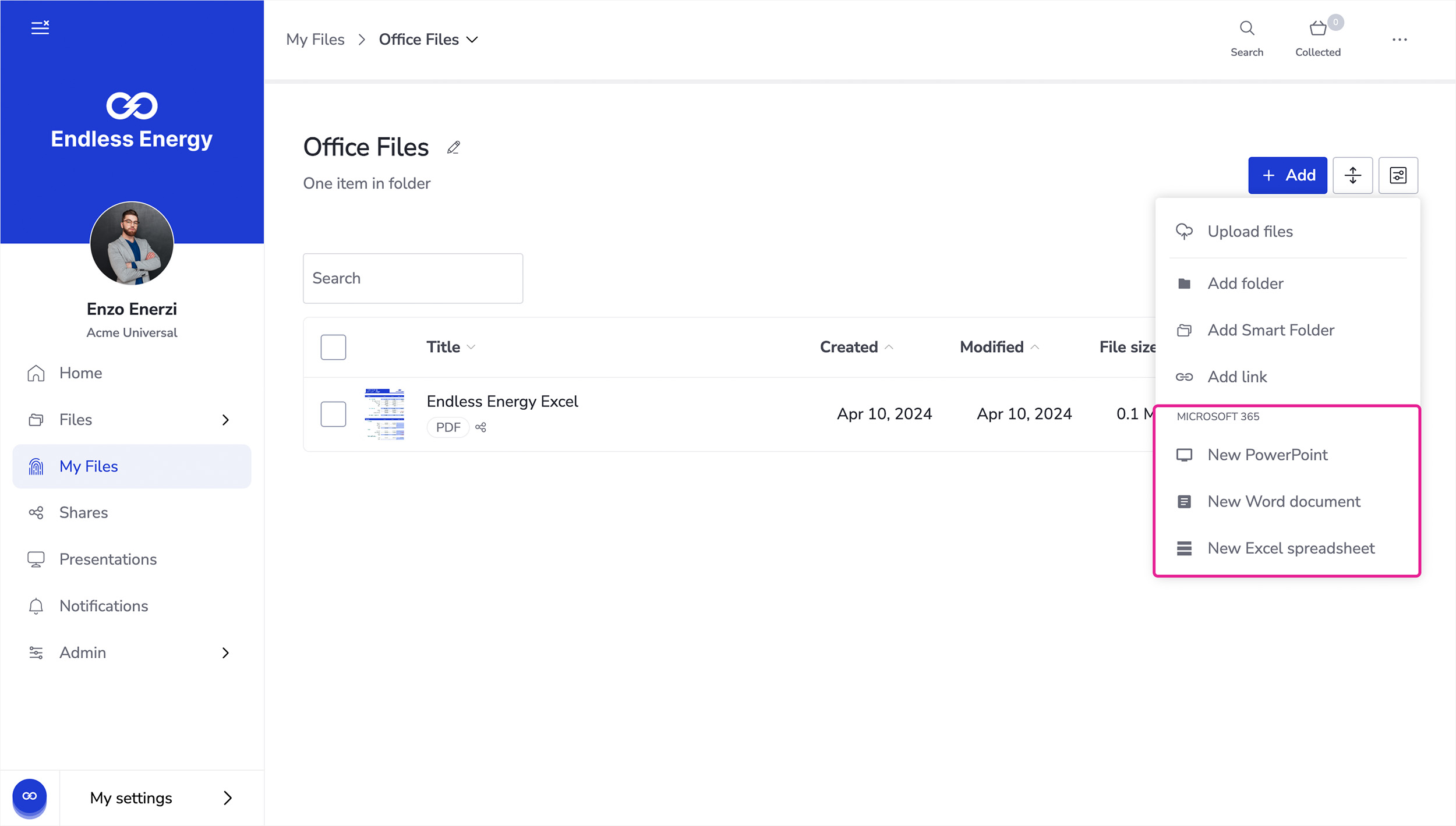
When a new Office file is created in Showell, it opens in Microsoft 365. All changes are saved automatically and synced to the user’s Microsoft 365 account. The file is then available both in Showell and in Microsoft 365.
This creates a seamless workflow between systems, without requiring downloads or manual re-uploads.
How the Microsoft 365 Office Editor Handles Different Editing Needs
Sales teams often face two editing scenarios: personalization and centralized updates.
When a seller needs to tailor a PowerPoint or adjust a proposal for a specific customer, they can use the Edit as new option. This creates a copy of the original file and stores it in the seller’s My Files. The master version remains untouched, while the seller gains full flexibility to adapt the content.
When a file needs to be updated directly, the Edit in option allows authorized users to make changes to the original document itself. This is typically used for maintaining shared materials.
For users, editing Workspace files is limited to copies stored in My Files. For admins, direct editing of Workspace files is available through Edit Mode in the Web App.
This distinction ensures that personalization does not compromise approved master files.
1. Built-In Sync with Microsoft 365
All Office files created or edited in Showell are automatically synchronized with the user’s Microsoft 365 account.
If changes are made directly in Microsoft 365, those updates can be synced back to Showell using the “Sync from” option in the file menu.
There is no need to re-upload files or manage multiple disconnected versions. Importantly:
-
Showell does not access files in Microsoft 365 that are not used in Showell
-
Files removed from Showell are not removed from the user’s Microsoft 365 account
-
Authorization between Microsoft 365 and Showell is required only once
In some organizations, Microsoft 365 admin approval may be required during the initial setup. Once approved, users do not need to repeat the process.
2. Preserve the Full Office Experience During Presentations
By default, Showell converts files to PDF for optimized viewing across devices.
However, with the Microsoft 365 Office Editor, an additional Office file viewing toggle becomes available for synced files.
This toggle allows users to view Office files directly in PowerPoint, Word, and Excel. When using the dedicated Office viewer:
-
PowerPoint animations and embedded videos are preserved
-
Excel spreadsheets remain fully interactive
-
The presentation behaves as intended in Microsoft 365
This is particularly valuable for sales teams who rely on advanced PowerPoint transitions or interactive Excel models during customer meetings.
The toggle is available for Office files synced through SharePoint, OneDrive, or TeamsDrive integrations, as well as for files created directly in Showell using the Office Editor.
How the Microsoft 365 Office Editor Simplifies Editing Presentations
For sellers, the benefit is clarity and efficiency. Instead of downloading files, editing locally, and re-uploading new versions, they can:
-
Create new PowerPoint, Word, or Excel files directly in Showell
-
Copy approved Workspace files into My Files for personalization
-
Edit content in Microsoft 365 with automatic saving
-
Access the same file from both Showell and Microsoft 365
There is no version confusion between local files and shared Workspace files. Sellers personalize safely, without risking unintended changes to the master version.
Preparation becomes faster, and the tools they already rely on remain central to the workflow.
How the Microsoft 365 Office Editor Keeps Workspace Files Protected
For administrators, control remains intact.
Workspace files can remain protected. Sellers can be required to create copies before editing. Editing permissions can be limited to specific roles. Direct Drive-style access to underlying storage is not required.
Admins maintain oversight of shared content while still allowing sellers to work in familiar Microsoft tools. This reduces bottlenecks. Instead of handling every small change request, admins can define clear boundaries:
-
Master files stay protected
-
Personal copies are editable
-
Updates to shared content remain controlled
The result is a governed, scalable content workflow that supports both compliance and sales agility.
Easy Integration with Familiar Tools
The Microsoft 365 Office Editor works through a secure, one-time authorization between Showell and Microsoft 365.
Once connected:
-
Files created or edited in Showell sync automatically to Microsoft 365
-
Updates from Microsoft 365 can sync back to Showell
-
The editing experience remains fully native
The Office Editor is fully accessible through the Showell Web App. Downloaded versions of the Showell App for Windows, iOS, and Android currently offer limited functionality, with ongoing enhancements planned.
Controlled Office Editing for Governed Sales Environments
Sales teams depend on Microsoft Office. At the same time, organizations depend on structured content control.
The Microsoft 365 Office Editor brings these two realities together. Sellers continue working in PowerPoint, Word, and Excel, files sync automatically with Microsoft 365, and admins retain control over master content.
Personalization happens where allowed and core content remains protected.
It is not about replacing Microsoft Office. It is about making it work seamlessly within a governed Showell environment.