




Marketing creates content. Sales does not use it.
Sales cannot find what they need when they need it. Marketing does not see the impact of the content they produce. Over time, this creates a loop where both teams operate in silos.
Sales enablement tools like Showell are designed to fix this by bringing content into one place and making it accessible to sales teams.
But access alone does not solve the problem. Sales still need to find the right content in the moments that matter, preparing for a meeting, responding during a conversation, or following up after.
This is where structure makes the difference. A well-structured Showell environment enables sales to find and use content in seconds. Without it, even the best content and the best tool will not deliver results.
Quick Checklist: Plan Your Showell Content StructureYou are not just organizing content into folders. You are designing how users find, access, and use content in real situations. This includes content flow, access through groups, and language setup working together. The end result is a Showell environment built around the needs of specific users or user groups. Use this as a quick reference when setting up or reviewing your structure: ☐ Who are your end users? (Internal sales, dealers, partners, or multiple teams) ☐ What is the main entry point? (Brand, product, region, asset type, or something else) ☐ What comes next? How does the structure guide users deeper toward the content? ☐ Is content easy to find? Can users reach it quickly without navigating multiple layers ☐ Is the structure internal, external, or both? Does it support how content is distributed? ☐ Do you need one workspace or multiple? Separate environments for teams, regions, or partners if needed. ☐ Who sees what? Define visibility rules for different user groups. ☐ Are your groups scalable? Group users in a way that is easy to manage at scale. ☐ Is language handled correctly? Ensure users see content in their language first. ☐ What is available offline? Balance accessibility with device storage. |
A Practical Framework for Structuring Content in Showell
Setting up your Showell structure is not just about deciding where content goes. It is about making content easy to find, safe to use, and natural to navigate in real sales situations.
That requires more than a logical folder setup. It requires understanding how your teams work, what different user groups need, and how structure supports the way content is actually used.
1. Start by aligning on how Showell works
Before defining your structure, align on how information is set up in Showell and what the platform makes possible.
This sets expectations early. It helps teams understand how content can be organized, how users will navigate it, and how structure, access, and presentation work together.
This is also the point where Showell becomes more than just a storage location. The platform gives you flexibility in how content is presented, separated, and accessed. That flexibility is valuable, but only if it is understood early enough to guide the setup.
Without this alignment, teams often start by recreating old folder logic instead of designing a structure that actually supports sales.
2. Define who will use Showell, and what each group needs
The next step is to identify your end users.
That can include internal sales teams, external dealers or partners, and often other internal teams such as marketing, product, customer success, or management. Showell often becomes a broader single source of truth, not just a tool for sales.
Different user groups do not just need different access. They often need different structures, or at least different ways of viewing the same content.
Sales may need quick access to customer-facing materials during meetings. Dealer networks may need a simpler structure with only the content relevant to them. Internal teams may need access to training materials, pricing, or internal guidance that should never be visible externally.
For global teams, language and regional needs add another layer. Content should feel relevant and familiar to each user group.
The key here is not just identifying who will use Showell, but understanding how each group needs to find and use content in practice.
3. Identify the most natural way for users to find information
Once your users are clear, the next question is how they naturally look for content.
This is where structure should be shaped. Every organization works differently. While Showell AI makes it easier to find content that are needed on the spot, sellers might also need the navigation to showcase other offerings and they may search in terms of sales stages, others by product line, market, business unit, or customer type.
If Showell is mainly used internally, sales leadership should guide this, because they understand how the sales process works and how content should support it.
If external users such as dealer networks are involved, enablement teams may need to take the lead, especially if sales leadership is not directly responsible for how those users work.
And if neither side has a clear answer, this is where Showell Customer Success Managers bring real value. They have seen how different organizations structure content across a wide range of customer setups, including complex ones. Their role is not just technical onboarding, but helping customers make better structural decisions based on what works in practice.
The goal is to build a structure that feels natural to the people using it, not just logical to the people setting it up.
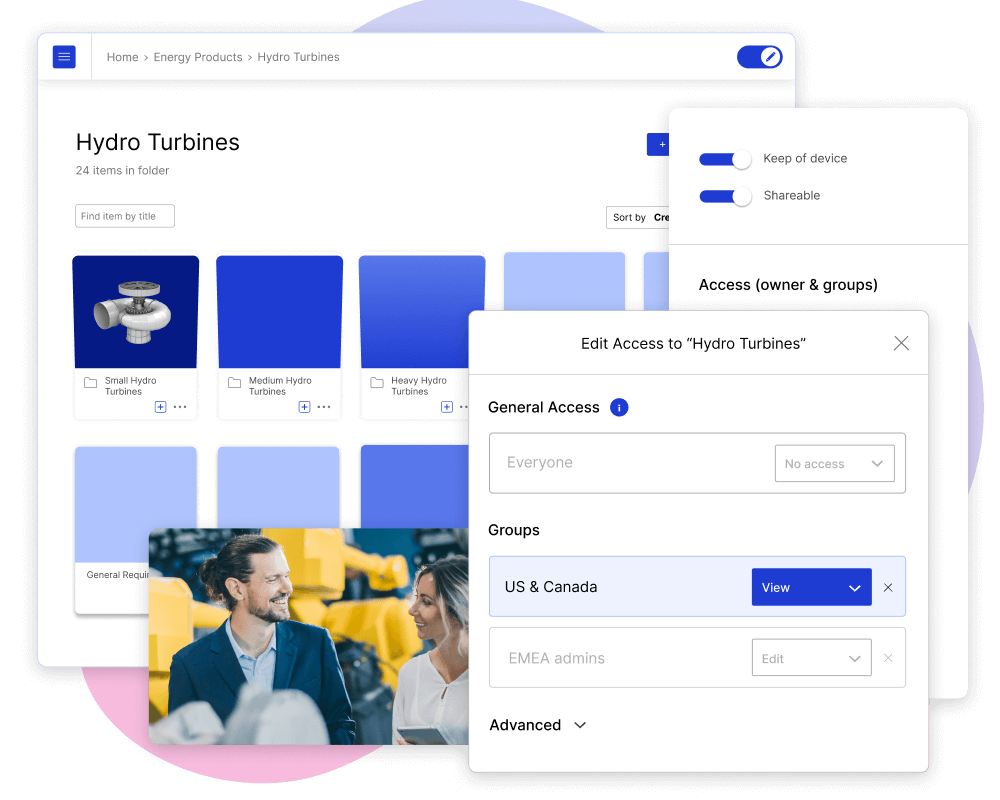
4. Define access and permissions early, and make the structure safe to use
Once you know who is using Showell and how they need to find content, define access and permissions early.
This is not just about governance. It is also about confidence.
When salespeople present from Showell, they need to feel safe using it. They should not worry about accidentally opening internal pricing, confidential strategy documents, or other materials that should never appear in a customer-facing context.
That means internal and external materials should be clearly separated. Customer-facing content should not sit next to confidential internal content in a way that creates risk.
This becomes even more important when different user groups exist across internal teams, partners, dealers, or regions. The structure should make it easy for each group to access only what is relevant, while also protecting what should stay hidden.
A structure that is safe to use is more likely to be trusted and adopted.
5. Design a structure that is easy to navigate
Once the foundations are clear, start designing the structure itself. A simple but effective rule: Content should be discoverable within three clicks
This means:
-
content should not be buried under multiple layers
-
users should not need to guess where something is
-
navigation should guide, not slow down
The structure should feel familiar and predictable:
-
naming is clear and consistent
-
navigation follows a logical path
-
users do not need to stop and think
This becomes critical as your content grows. A small content library can tolerate a messy setup. A large one cannot. The more content you have, the more important it is that:
-
the structure stays clear
-
navigation remains simple
-
content remains easy to access
A good structure does not just organize content. It makes a large volume of content usable.
6. Prepare content to match the structure and the moment of use
Even the best structure will fail if the content itself is not prepared properly. Content should not just be stored in the right place. It should be ready to use in the moment.
That means:
-
content is current and up to date
-
naming is clear and consistent
-
materials match real sales situations
If content needs editing, reformatting, or explanation before sharing, it slows sales down and reduces adoption.
It is also important to think beyond a single asset. When a salesperson presents content in Showell and moves forward, what comes next?
-
does the structure guide them to the next logical piece of content
-
does it support the flow of the conversation
-
does it create opportunities for cross-selling or introducing related materials
This is where structure and content work together. The goal is not only to help users find content, but to support how conversations develop in real situations.

7. Align the structure with how sales actually works, and be prepared for change management
Even when sales leadership has a clear view of how materials should be used, sales teams may not be ready to adopt that model immediately.
This is an important nuance.
A new content structure often introduces a new way of working. It may reflect a better sales process, clearer guidance, or a more standardized approach. But that does not mean the team will automatically follow it from day one.
In practice, this means setting up Showell can become part of a broader change effort. The structure should support current sales behavior enough to feel usable, while also helping guide the team toward a more consistent way of working over time.
So the question is not only, “What is the ideal structure?” It is also, “What structure will our sales team actually adopt?”
This is where enablement, sales leadership, and Customer Success all play a role. The structure has to make sense to the end user, not just to the people designing it.
8. Use Showell’s capabilities to support your structure
Showell gives you the flexibility to support all of this, but its value depends on how intentionally it is used.
- Layout Builder plays a key role here. It allows you to design how content is presented and navigated, not just where it sits. This helps make structure feel clearer and more intuitive to the end user.
- Workspaces help separate content across business units, teams, regions, or partner networks. Many customers use these as separate environments for different user groups or use cases.
- Digital Sales Rooms can support this further by acting as additional spaces for specific needs or content groupings.
- Multi-language support is essential for global teams and dealer networks, where the same content needs to be available in different languages.
- SSO authentication supports secure and seamless access across user groups.
- Showell Analytics gives visibility into how content is actually used, which is critical for understanding whether the structure is working in practice.
These capabilities are not valuable on their own. They become valuable when they are used to make the structure clearer, safer, and more usable.
9. Track usage, gather feedback, and keep refining
A good structure is never final. Once users start working with it, the real learning begins. Showell Analytics helps you see what content is used, what is ignored, and where users may be dropping off.
But analytics alone is not enough.
User feedback is extremely important, and many teams do not use it enough when refining their structure. When content is not being used, the answer is not always obvious from data alone. Sometimes the content is not relevant. Sometimes it is relevant, but difficult to find. Sometimes the structure makes sense on paper, but not in daily use.
That is why analytics and direct feedback should be used together. Over time, this helps you identify what to improve, what to simplify, and what to remove. It also helps keep the structure aligned with how people actually use Showell, not just how it was originally designed.
10. Help users navigate the structure in a way that feels familiar
Finally, users need to feel comfortable using the structure in real situations. This is not just about showing them where things are. It is about making the structure feel familiar, understandable, and safe enough that they trust it in front of customers.
If salespeople are unsure where to go, worried about opening the wrong content, or unclear about how materials support their process, adoption will suffer.
That is why the structure should be introduced in the context of how sales actually works. In practice, this means:
Make it part of real sales workflows
-
walk through how to find content when preparing for a meeting
-
show how to navigate during a live customer conversation
-
demonstrate how to follow up using the structure
Use real scenarios, not generic walkthroughs
-
“You have a discovery call tomorrow, where do you go?”
-
“A customer asks for pricing, how do you find it quickly?”
-
“You want to share a case study, what is the fastest path?”
Observe how sales actually uses the structure:
-
where do they hesitate or pause
-
what takes longer than expected
-
what do they click first, and why
Gather feedback in context:
-
what feels unclear or unintuitive
-
what they expected to find but did not
-
what they avoid using altogether
Close the loop with small improvements:
-
adjust naming or placement based on feedback
-
simplify navigation where users struggle
-
remove friction instead of adding more structure
The goal is not to “train” the structure, but to make it feel natural to use. When the structure matches how salespeople think and work, they will use it without needing to think about it.
Conclusion: Showell and Structure Go Hand in Hand
Showell brings your content into one place. Structure determines whether that content actually gets used.
The tool and the structure work together. Showell gives you the capabilities to organize, separate, protect, and deliver content. A strong structure ensures those capabilities support how your teams actually work.
When the structure is clear, safe, and built around real usage, sales can find content faster, use it more confidently, and rely on it in the moments that matter.
That is when Showell becomes more than a content library. It becomes part of how sales works.