

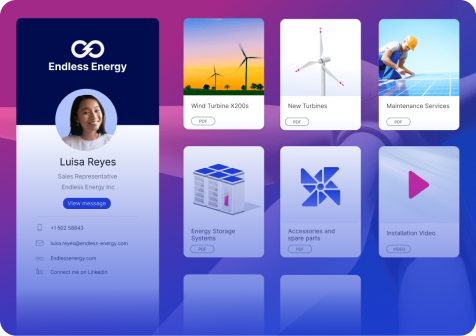

A customer asks a simple question: "Which model should I choose?"
Your seller opens the product catalogue, then the price list, then a spec sheet. If they're still unsure, they message a product manager and promise to come back with an answer. The buyer waits. The meeting loses its momentum.
Complex products get easier to sell when the seller no longer has to carry the whole portfolio in their head. Showell Flow Apps do that by building your product knowledge and selection logic into the conversation itself, on top of the content you already have.
|
Key takeaways
|
What Flow Apps Are
Flow Apps are custom-built interactive tools inside Showell that guide the sales conversation. Each one is designed around a specific part of how your team sells and built on the content you already have, such as catalogues, spec sheets and price lists.
Every company has its own way of selling, so Flow Apps aren't limited to a predefined set of tools. They can be built around your specific sales process and needs.
For example, a Flow App can:
-
Guide sellers through a sales process, step by step
-
Help buyers explore and compare products or solutions
-
Calculate outcomes, potential savings, return on investment (ROI) or recommended system size
-
Capture customer information, needs and preferences during sales conversations
-
Integrate with existing systems, such as your Customer Relationship Management (CRM) system, to share information and support follow-up activities. Sending data to the CRM and using real-time data need a connection
Sellers open Flow Apps in Showell next to the rest of their sales content, and they also work offline. They can also share them with the buyer after the meeting. The Showell team builds each one with you.
See the four Flow Apps in action in 90 seconds.
In the video: a sales playbook that structures every stage, an interactive product brochure for comparing products with the buyer, a system configurator that builds the complete system, and a needs assessment form that syncs answers to the CRM.
Why Complex Products Are Hard to Sell
Complex products aren't hard to sell because the information is missing. They're hard to sell because the seller has to find and apply all of it in one meeting.
Think about what a seller needs to know to recommend the right solution from a wide technical range:
-
Many products and variants
-
Different applications and use cases
-
Configuration and compatibility rules
-
Accessories and add-ons
-
Technical requirements and product limitations
That knowledge is usually spread across catalogues, spreadsheets, technical documentation and the people who've been in the company longest. Each source does its job. None of them is built to be used live, in front of a buyer who wants an answer now.
In the Showell Flow Apps webinar Making Complex Products Easier to Sell, Leigh Perez, Product Marketing Manager at Showell, described this as three loads the seller carries at once:
Even an experienced seller struggles to carry all three. A new seller knows less of each, and so does a dealer who represents several manufacturers.
What It Costs When Sellers Rely on Memory
When selling depends on memory, the outcome depends on who is in the meeting. That shows up in places a sales leader can see:
-
Onboarding takes months. New sellers need time before they're confident across the portfolio. Training also takes time from sales managers and product experts.
-
Product experts become a help desk. Sellers depend on them for recurring questions. Every new product or portfolio change means retraining.
-
Recommendations vary. Two sellers facing the same buyer can propose different solutions.
-
The full solution goes unsold. Accessories, add-ons and related products are easy to forget when nobody prompts for them.
-
Configurations go wrong. The more combinations a range allows, the bigger the risk of a mistake that surfaces after the order.
-
Customer time goes to searching. Minutes spent paging through documents are minutes not spent understanding the buyer.
For dealer and distributor networks the effect is bigger. A dealer who sells products from several manufacturers will default to the range that's easiest to explain, which is why dealer sales enablement starts with making your range the easy one.
What Good Looks Like: Flow Apps Across the Sales Process
In a guided conversation, the seller focuses on the buyer and the Flow App carries the complexity at each stage of the deal. The principle is simple: your sellers shouldn't need to memorize your entire product portfolio to sell it well. This is the idea behind guided selling.
For the webinar, we built four Flow Apps for a sample manufacturer of solar products: modules, charge controllers, batteries and lighting, sold as single products and as complete systems. All four came from one existing product catalogue. The information didn't change. What changed was how the seller and the buyer used it together.
Here they are in the order a deal moves:
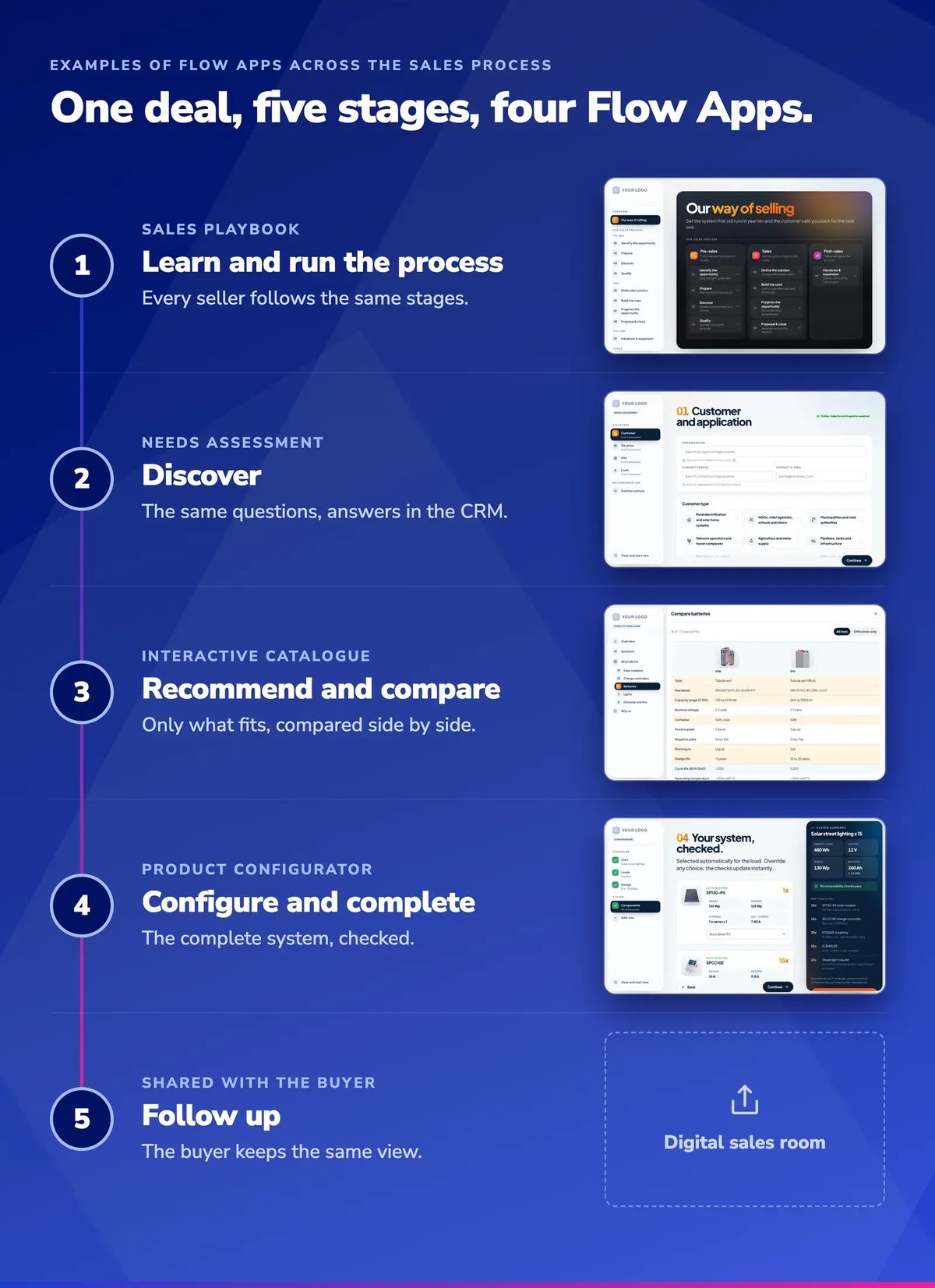
Visual 1: The four example Flow Apps placed on the stages of one deal. Screens are from the webinar demo.
Your own process decides which stages need a Flow App and what it looks like.
4 Examples of Flow Apps in a Sales Process
Each example starts with a moment every seller of technical products knows. It shows how that moment goes today with PDFs and spreadsheets, then what a good Flow App for it looks like and why it works better. Together with the follow-up, they cover the whole deal from preparing the first meeting to the follow-up after it.
1. Learn and Run the Process: Sales Playbook
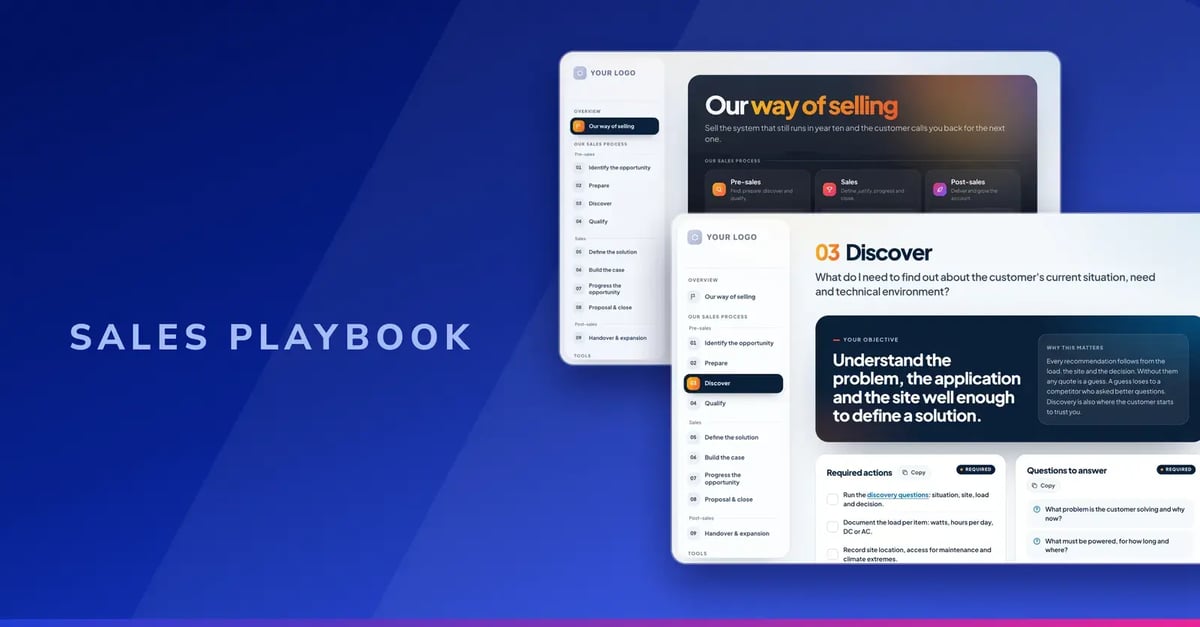
Visual 2: Example of a sales playbook built with Showell Flow Apps
The moment: a seller is preparing for a first meeting with a new account and wants to know what a good discovery meeting looks like in your company.
The old way: the sales process lives in a slide deck from the last sales kickoff and a PDF playbook in a shared folder. Finding the file and right page takes longer than the meeting prep itself, so most sellers don't. They run the meeting the way they always have. New sellers copy whoever they shadowed first.
What a good playbook contains: as Leigh puts it: "The aim isn't to document everything, because a good playbook shows the seller what matters in the situation they are in at that moment." In practice, that means six things per stage. Here they are for a typical Discover stage, the first real meeting with a new account:
For example, the playbook can guide sellers through clear, actionable sales stages, from “Identify the opportunity” to “Handover and expansion”, making the entire sales process easier to understand, follow and put into practice. Every stage follows the same structure, so sellers always know where to look.
Why a sales playbook works better as an interactive tool than a static document:
Easier for the seller: they prepare in minutes and walk into the meeting with the right questions already in their notes.
Better for the sales leader: the process you designed at kickoff is the one sellers actually prepare with. New sellers learn it in the same place they sell.
2. Discover: Needs Assessment
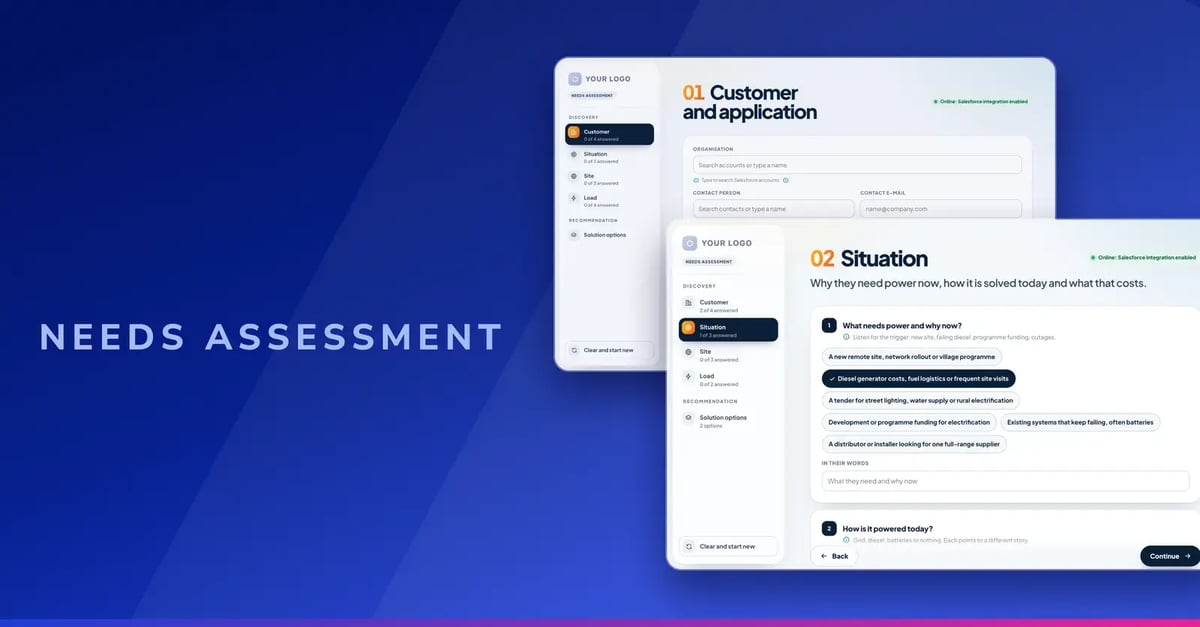
Visual 3: Example of a Needs Assessment Built with Showell Flow Apps
The moment: in the first meeting, a production manager mentions in passing that their current machines stand still a few times a month and that every stoppage costs them a shift.
The old way: whether that remark becomes part of the deal depends on the seller. One writes it down and asks what a lost shift costs. Another nods and moves on to the product demo. The notes live in a notebook or an email draft. Half of what was learned never reaches the CRM. Three weeks later, the proposal talks about features, the buyer's real cost is nowhere in it and a colleague who joins the deal starts from zero.
What a good needs assessment contains: the same short set of questions, asked in every meeting, covering the five things every proposal depends on:
Each question has answer options for the common cases and room for the buyer's own words, so the seller can tap the answer during the conversation instead of writing it up afterwards.
Why it works better as an interactive tool than a static questionnaire:
Easier for the seller: the right questions are on screen in the right order. Nothing has to be typed up after the meeting.
Better for the sales leader: every opportunity carries the same discovery data. You can see which deals are missing the answers that decide them. The proposal is built on the buyer's real cost, not on a feature list.
3. Recommend and Compare: Interactive Product Catalogue
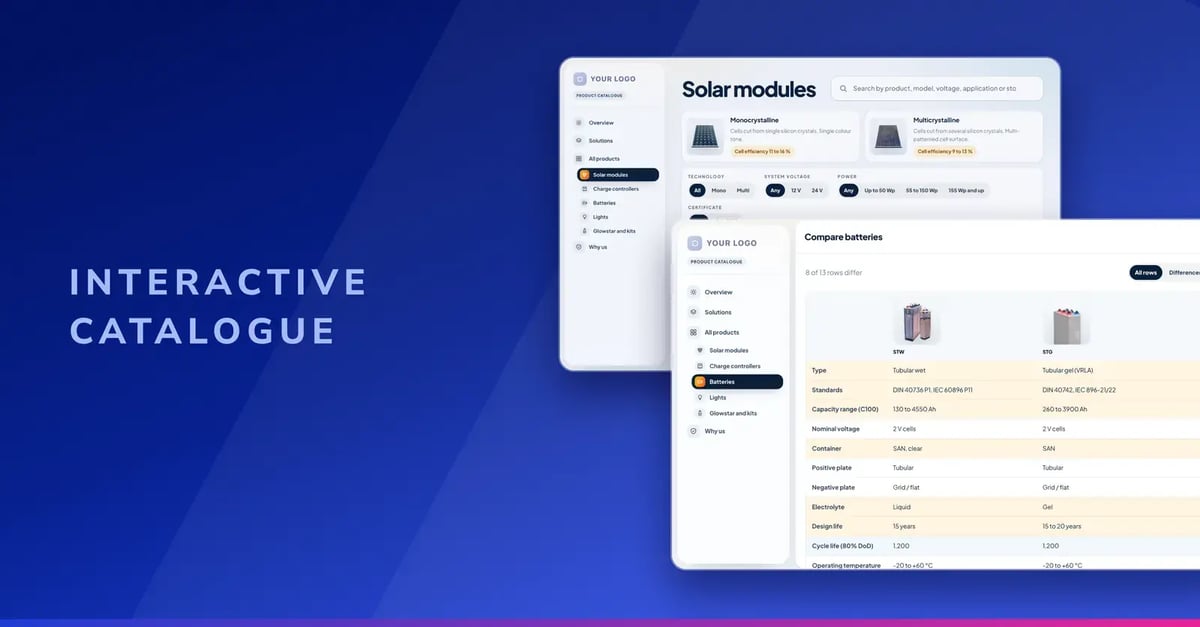
Visual 4: Example of an Interactive Catalogue Built with Showell Flow Apps
The moment: the buyer has narrowed it down to two models and asks the question every seller hears: "What's the real difference? Which one should we choose?"
The old way: the answer is spread across two spec sheets, a product catalogue and maybe a price list, each with its own layout. The seller flips between files on a laptop while the buyer waits, then promises to send a comparison after the meeting. By the time it arrives, the buyer has asked a competitor the same question.
What a good interactive catalogue contains:
Why it works better as an interactive tool than a static catalogue:
Easier for the seller: they don't need to know every specification by heart.
Better for the sales leader: buyers get an answer while they're still engaged. The catalogue your product marketing team already produced finally works in the meeting, not only as a download.
4. Configure and Complete: Product Configurator
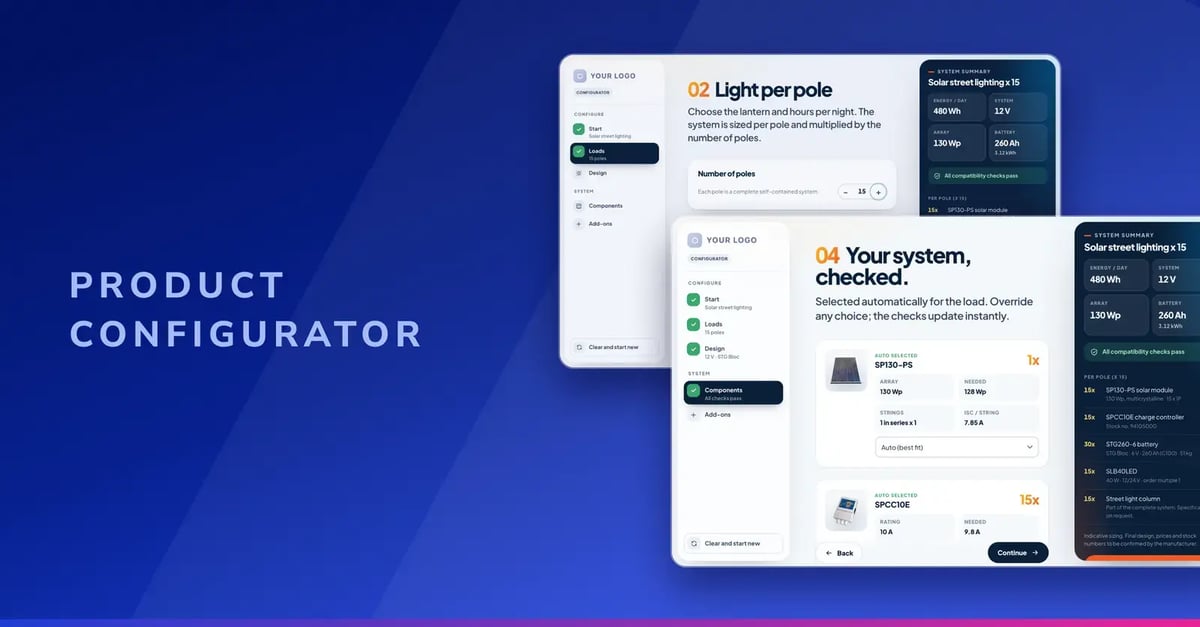
Visual 5: Example of Product Configurator Built with Showell Flow Apps
The moment: the buyer doesn't need one product. They need a complete solution: a main unit, the right options for their site and the accessories that go with it.
The old way: the seller works it out from a compatibility spreadsheet, the option lists in the catalogue and a message to a product manager. If one option doesn't fit the main unit, the mistake shows up after the order. Accessories and add-ons are easy to forget, so the full solution goes unsold.
What a good configurator contains:
Why it works better as an interactive tool than spreadsheets and option lists:
If you already use a CPQ system, the configurator doesn't replace it. It works out the right solution with the buyer. The result then goes to your CPQ for pricing.
Easier for the seller: the compatibility rules are built in, so they can configure a complete solution in front of the buyer without calling a product specialist.
Better for the sales leader: sellers recommend the complete solution, including the add-ons. Fewer configuration mistakes reach the order.
Follow Up After the Meeting: Share What Was Discussed
The moment: the meeting went well. Now the buyer has to explain your solution to a finance director who wasn't there.
The old way: the seller sends a follow-up email with three PDF attachments and a summary written from memory. The buyer forwards it. Whatever they say internally is their own retelling.
With the Flow App: the seller shares the configuration and the comparison in a Digital Sales Room, exactly as they were in the meeting. The buyer can open the configurator again, change a quantity or an option and see the solution update.
Easier for the seller: no summary to write. The meeting is the summary.
Better for the sales leader: the buyer's internal pitch uses your numbers, not their memory. You can also see when the room is opened.
What Flow Apps Change for Each Role
Each role that owns part of the problem gets a different result from the same guided conversation.
How to Find Your First Flow App
Don't start by asking which Flow App to build. Start by asking where selling becomes unnecessarily difficult today.
Step 1: Bring the right people together
Involve the people who see the problem from different sides:
-
Sellers
-
Sales managers
-
Product experts
-
Dealer or channel salespeople
-
Your Showell Customer Success Manager (CSM), if you're already a customer
Watch real sales situations or run a short survey. Look for the moments where selling slows down or depends on one person's knowledge.
Step 2: Ask the questions that reveal the friction
|
Nine questions to ask your team
|
Step 3: Pick one recurring sales problem
Choose a moment that is:
-
Frequent
-
Commercially relevant
-
Painful today
-
Easy to understand and improve
A good first problem sounds like this: "Our sellers often struggle to choose between five similar product models."
Step 4: Match the problem to a type of Flow App
Then work with Showell to turn that your content or knowledge base into a guided sales experience. Every Flow App is custom built around your own process, products and systems.
Frequently Asked Questions
Do we need new content to build a Flow App?
Usually not. The four example apps in the webinar were all built from one existing product catalogue. Your catalogues, spec sheets and price lists stay the foundation.
We already have a CPQ. Do we still need a configurator?
A Configure, Price, Quote (CPQ) system handles pricing and the final quote. A Flow App configurator covers the earlier part: working out the right solution with the buyer. Its result can then be passed on to your CPQ.
Can our dealers use Flow Apps?
Yes. Flow Apps run inside Showell, so dealers and distributors who use Showell can use them in their own customer meetings.
Can buyers use the Flow App themselves?
Yes. A needs assessment, configurator or calculator can be shared with the buyer, for example in a digital sales room.
Which CRMs can a Flow App connect to?
The webinar demo connected to Salesforce. Flow Apps can also connect to other CRMs, such as Microsoft Dynamics, and to Enterprise Resource Planning (ERP) and Product Information Management (PIM) systems. See Showell integrations for what Showell connects to today.
Find the Sales Moment Worth Fixing First
Pick one recurring moment where your sellers struggle and talk with our experts. We’ll suggest you what a Flow App designed to solve that challenge could look like.